
Secure Boot Certificate Expiration – Part 2: Discovery & Rollout with Ivanti Neurons Bots

In the first part of this series, we showed why the renewal of Secure Boot certificates in 2026 is not a sure thing: Windows Server does not receive an automatic rollout, devices with outdated OEM firmware fail the update, and if Secure Boot is permanently disabled, there is a risk of a chicken-and-egg dilemma when DBX is later revoked. The key takeaway: Without reliable reporting, no one knows which devices are affected—and that’s exactly where we’re focusing our efforts now.
In this part, we’ll show how Ivanti Neurons handles the discovery and controlled rollout of the 2023 certificates—using a concrete, production-ready bot that maps both processes into a single workflow.
Why Ivanti Neurons?
Of course, certificate status can also be collected via GPO logon scripts, network shares, and Excel reports. Anyone who has ever managed this for a few thousand devices knows the drawbacks: outdated data, devices that are offline and not accounted for, and no feedback on whether remediation was actually successful.
Ivanti Neurons addresses these issues at the structural level:
- Ein One agent, up-to-date data: The Neurons Agent delivers device data directly from the cloud console – without logon scripts, network shares, or manual consolidation.
- Discovery and remediation in a single workflow: A bot identifies affected devices and triggers the update. No disruption between reporting and action.
- Low-Code with PowerShell extensibility: The graphical bot editor maps out the logic (filters, branches, reports, email); the actual business logic is contained in two PowerShell stages that strictly adhere to the Microsoft Secure Boot Playbook.
- Status management included: Using the Bot Data Store, the bot tracks when remediation was triggered for each devic – and automatically escalates if a device is still non-compliant after 14 days.
- Controlled rollout: As a Schedule Bot, the workflow runs cyclically against defined device groups. Pilot group first, then expansion – without any additional infrastructure.
The Bot at a Glance
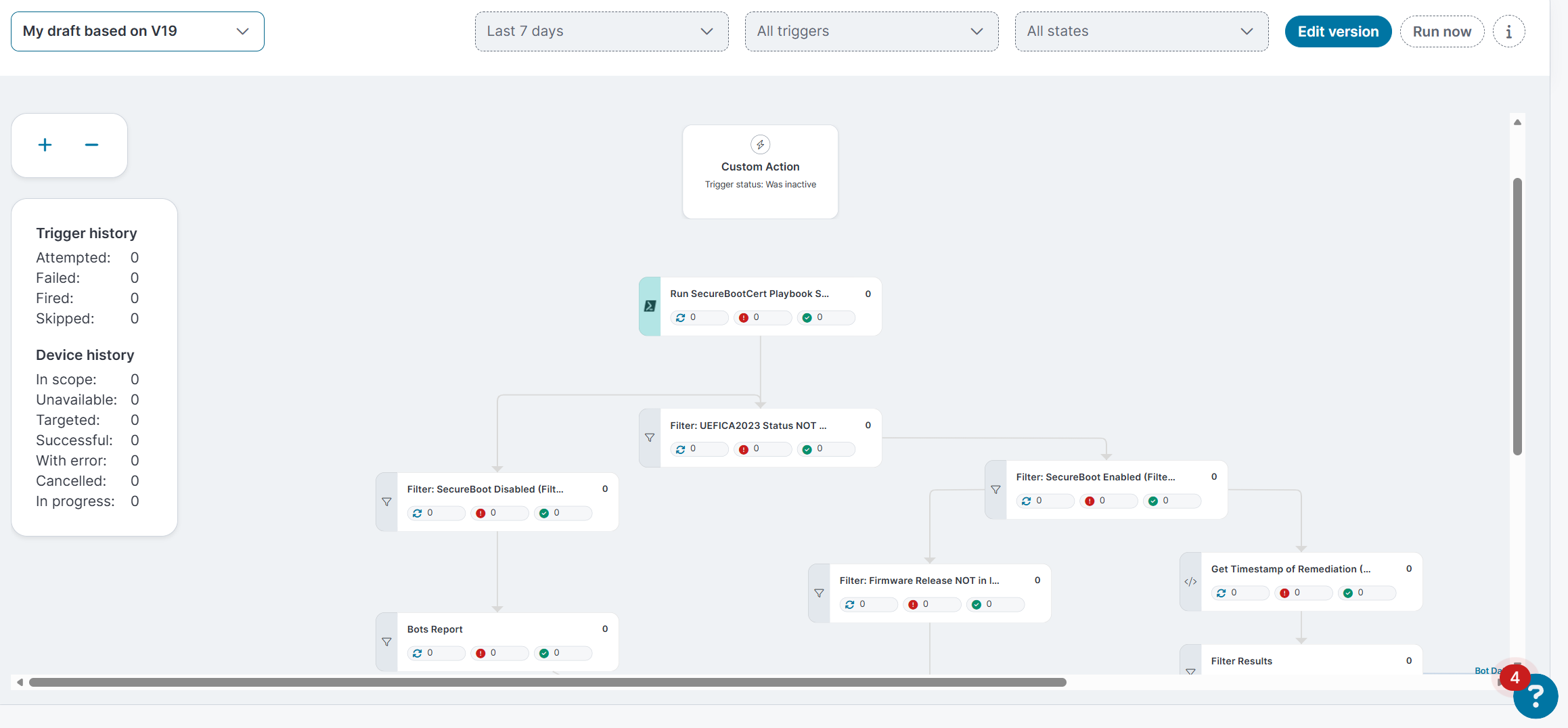
Bot Structures
The bot consists of four logical blocks:
- Detection: A PowerShell query collects the complete secure boot and certificate status on each device.
- Filter: Only devices with a UEFICA2023Status ≠ Updated continue through the workflow – compliant devices are immediately removed from the workflow.
- Branch by cause: Devices with Secure Boot disabled, outdated firmware, or missing remediation are handled separately.
- Remediation, Status Management, and Reporting: Affected devices receive the update trigger, progress is monitored, and an email report summarizes everything.
Step 1: Detection – The Complete Status in a Script
The first stage is a PowerShell query that collects all relevant data points and passes them to the bot as structured output. The data collected includes, among other things:
- Status of the Secure Boot Update Policy
- Update status and any error messages
- Various device attributes (manufacturer, model, etc.)
- UEFI version and date
- Secure Boot related events (Event IDs: 18xx)
- Status of the scheduled tasks
Two details are particularly noteworthy:
Firmware age as an early warning indicator: The firmware release date from the DeviceAttributes reveals which devices haven’t received a BIOS update in years—precisely the candidates where the certificate update might fail due to known firmware bugs (Part 1, “Risk Scenarios” section).
Recommendation Engine: The script evaluates the collected data in order of priority and provides a unique RecommendedAction for each device: ranging from EnableSecureBoot to OEMFirmwareUpdate (Event 1803) and Reboot, all the way to Wait if the update is simply in the regular backoff period. The report thus not only shows that a device is non-compliant, but also what to do next.
Step 2: Filtering and Branching
Nach After detection, the bot filters for UEFICA2023Status ≠ Updated and then branches based on Secure Boot status:
Secure Boot disabled: These devices are included in a separate Bots Report. Automation won’t help here—Secure Boot must be enabled in the firmware before Windows is allowed to write the DB/DBX updates (see Part 1: Devices with Secure Boot permanently disabled). The report highlights this group so that it can be processed before the DBX revocation.
Secure Boot enabled, firmware older than 700 days: A second filter identifies devices whose firmware release dates back more than about two years. These devices appear in a separate report as candidates for an OEM firmware update before the certificate update is enforced.
Secure Boot enabled, remediation possible: All remaining devices enter the remediation branch.
Step 3: Remediation – initiating the update in a targeted manner
The Remediation Stage performs exactly the steps that Microsoft specifies for a manually controlled rollout:
- Check whether the script is running with elevated privileges and whether Secure Boot is enabled
- Optional: Pause BitLocker protectors for two restarts (
manage-bde -protectors -disable -RebootCount 2) Enable the scheduled task \Microsoft\Windows\PI\Secure-Boot-Update- Set
AvailableUpdatesto0x5944– the opt-in for the full certificate and boot manager update - Optional: Start the task immediately
- Write the result and status values to a separate registry branch, which the next detection will retrieve
Important: The script does not force a reboot. The reboots – the update requires several – take place during the regular maintenance windows. This ensures that the rollout remains manageable, even for critical systems.
Step 4: Bot Data Store – Duplicate Detection and Escalation
One detail that sets the bot apart from a simple script rollout: Before remediation, the bot checks the Bot Data Store to see if an update trigger has already been set for the device (CertUpdateTriggeredTimestamp).
- No entry found: Remediation is in progress; afterward, the trigger flag and timestamp will be saved (expires after 180 days).
- Entry older than 14 days, device still non-compliant: The device is included in the escalation report “Remediated but not Compliant after 14 days” – including the
UEFICA2023Errorand the error event. These devices require manual analysis, typically due to firmware issues (Event 1795/1802) or a missing KEK update (Event 1803).
This way, the bot triggers the update exactly once per device and automatically flags devices that are stuck, rather than processing them in an endless loop.
Reporting: Everything in One Email
At the end, a join stage merges the branches and sends an email report to the user who initiated the process: for each device, it includes the hostname, UEFICA2023Status, error codes, opt-in values, firmware version, and last boot time. The bot reports from the individual branches also remain available in the Neurons console – as a work queue for manual cases.
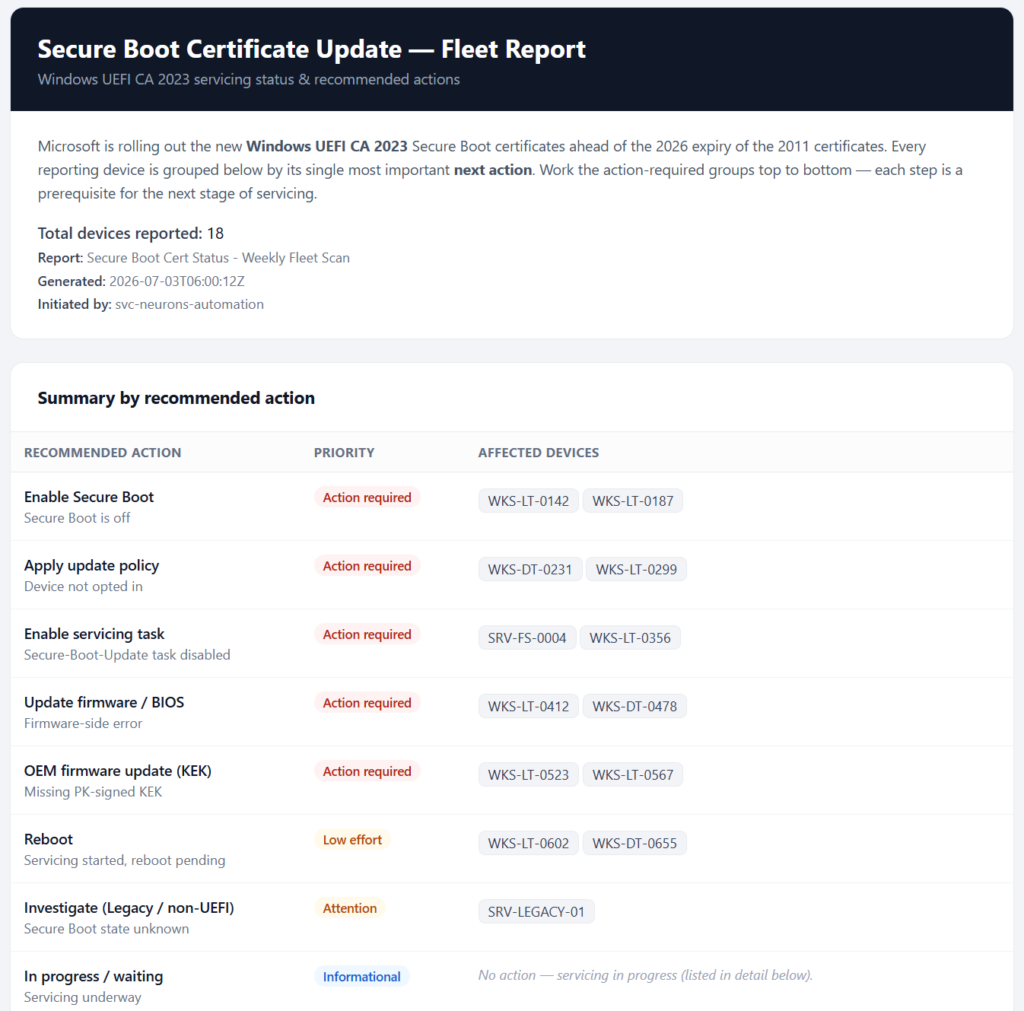
Secure Boot Status Email Report
Extension: Automatically Create Tickets in ITSM
Email reports are great for getting an overview—but for traceable processing, manual cases belong in ITSM. This, too, can be handled directly within the bot: Neurons includes pre-built integration stages for Ivanti Neurons for ITSM and ServiceNow, which the bot uses to create an incident or a change for each affected device.
This is particularly useful at three points in the workflow:
- Secure Boot disabled: One ticket per device, assigned to the client team—including the hostname, model, and the
RecommendedActionfrom the detection. Activation in the firmware requires manual intervention (on-site, if necessary) anyway. - Outdated Firmware: A collective or individual ticket for the upcoming OEM firmware update, including the firmware version and release date as a basis for the work.
- Escalation cases after 14 days: Devices for which remediation has not been successful generate a ticket with
UEFICA2023Error, an error event, and Known-Issue-ID (KI_*) – this allows the analyst to start directly with the relevant diagnosis rather than from scratch.
The stage is simply placed after the respective filter; the bot populates the field values (short description, description, assignment group, priority) using the output from the detection stage. Important for operation: Similar to the update trigger, ticket creation via the Bot Data Store should also be protected against duplicates so that a weekly scheduled bot does not create a new ticket for the same device on every run.
The result: A monitoring bot becomes a closed-loop process—detect, resolve, and anything that can’t be resolved automatically is sent as a ticket with full context to the right team.
Operating Recommendations
- Run as a schedule bot: Run it weekly against the target groups. Detection is read-only and therefore non-critical; thanks to the Data Store, remediation occurs only once per device.
- Start with a pilot group: Begin with a small group of devices with a mix of hardware types, then expand gradually—as recommended in Part 1.
- Actively address special cases: The reports for disabled Secure Boot and outdated firmware are not an end in themselves. Otherwise, these devices will fail at the DBX revocation stage at the latest.
- Don’t forget Windows Server: There is no automatic rollout for this platform – the bot is the only managed way to opt in for servers.
Conclusion
The real challenge of the 2026 certificate renewal isn’t the individual update itself, but rather ensuring transparency across thousands of devices—and the ability to take targeted corrective action. With Ivanti Neurons Bots, both can be handled in a single workflow: comprehensive discovery according to the Microsoft Playbook, targeted remediation via opt-in, automatic escalation for problematic devices, and reporting that turns raw data into concrete recommendations for action.
This brings us full circle to Part 1: Anyone who knows today which devices do not yet carry the 2023 certificates won’t have to worry about the DBX revocation tomorrow.
Do you have any questions? Just get in touch—we’ll take care of it.
Never miss news again?